









What makes Counterplay different
More than a list of counters: four things you'll use every game.
Everything at a glance in a compact sidebar
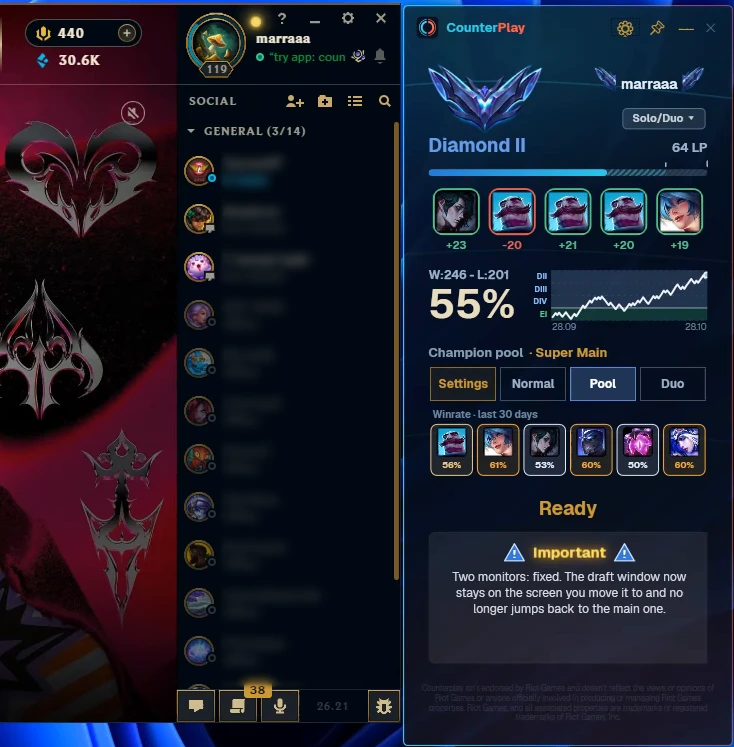
A slim panel sits next to the client while you wait for a match: rank and LP, your last five games, a win rate graph and the pool you're queuing with.
- Rank, LP and your last five games in one place
- 30-day win rate on every champion in your pool
- Normal, pool or duo mode in one click
Synergy and counters change as you hover
Move the cursor over a suggestion and the rings around your allies and enemies update instantly. You see how a champion fits this exact draft before you lock in.
- Ally rings: how well the pick works with each teammate
- Enemy rings: who it beats and who it struggles against
- Numbers come from win rates in real games
Pools for solo and duo players
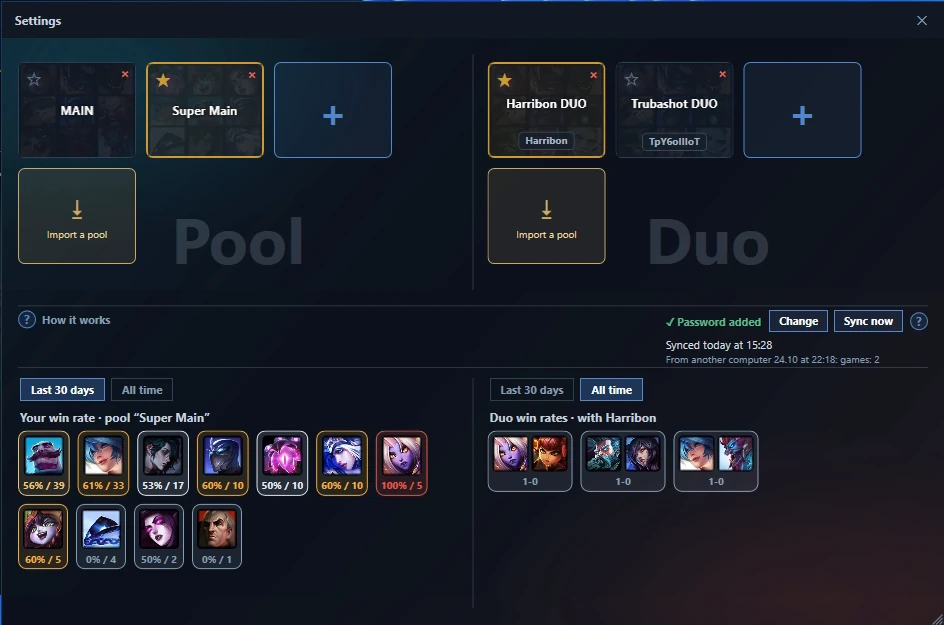
Add the champions you actually play for each role and suggestions come from your pool first. Playing with a friend? Make a duo pool: Counterplay recognizes your partner in the lobby and suggests picks that work for both of you.
- A pool for every role, with your win rate on each champion
- Duo pools with your partner's champions and your pair win rates
- Share a pool with a friend as a code or a file
One-click runes and a Counterplay AI build
Once you lock in, Counterplay shows three keystones and the most-played build for your champion and role. When all five enemies are picked, Counterplay AI adds a second build made for that team: it reads their damage, healing and crowd control and swaps out items that would do little against them.
- Apply runes creates the rune page and sets your summoner spells, with Flash on your usual key
- Export puts either build into Item Sets in the in-game shop
- AI swaps are highlighted, and it only uses items players really build on this champion
How it works
Three steps and the hints are right in front of you.
Install and run
Download the installer and launch Counterplay. It finds your League of Legends client automatically.
Enter the draft
Start champion select in any mode. The overlay appears beside the client.
Get recommendations
Hover champions or lock picks — recommendations recalculate instantly.
FAQ
Is it safe and legal?+
Yes. Counterplay only reads the official client API (LCU) and works during the draft phase only — no hints during the game itself and no reading of game memory.
Can I get banned?+
Counterplay only reads the official client API (LCU) and gives hints in champ select only. It never reads game memory, never touches the game itself and shows no hints once the match starts. What Riot's policy actually says.
Do I need to log in with my Riot account?+
No. The app never asks for your login or password and has no access to your account.
Is Counterplay free?+
Yes. Counterplay is free for Windows 10 and 11, with no ads. Advanced features may come later, and the core will stay free.
Does it import runes into the client?+
Yes. One click puts the recommended rune page straight into your League client.
Will it slow down my game?+
Counterplay does its work in champ select. By default it hides to the system tray when the match starts, so it draws nothing over the game.
Where do the win rates come from?+
From real ranked matches of the current patch, collected via the official Riot API and aggregated by role and elo.
What are the system requirements?+
Windows 10 or 11. The installer sets up everything; no manual configuration needed. Counterplay is a standalone app and does not rely on any other platform.
Counterplay is completely free right now.