Porofessor vs Counterplay: Which League Overlay is Better for Low-End PCs?
Companion apps have become a standard part of playing League of Legends. From tracking enemy cooldowns to analyzing draft counters, overlays offer valuable real-time insights that help players make smarter tactical decisions.
However, many popular tools come with a hidden trade-off: high resource usage. If you play League on a budget setup or a mid-range PC, running a heavy overlay alongside the League client can cause noticeable frame drops, input lag, and system stuttering during crucial teamfights.
In this guide, we compare Porofessor and Counterplay to help you decide which overlay offers the best balance of drafting intelligence, visual clarity, and system performance.
The Core Problem: Framework & Resource Overhead
To understand why some companion apps slow down your game, you first need to look at how they are built.
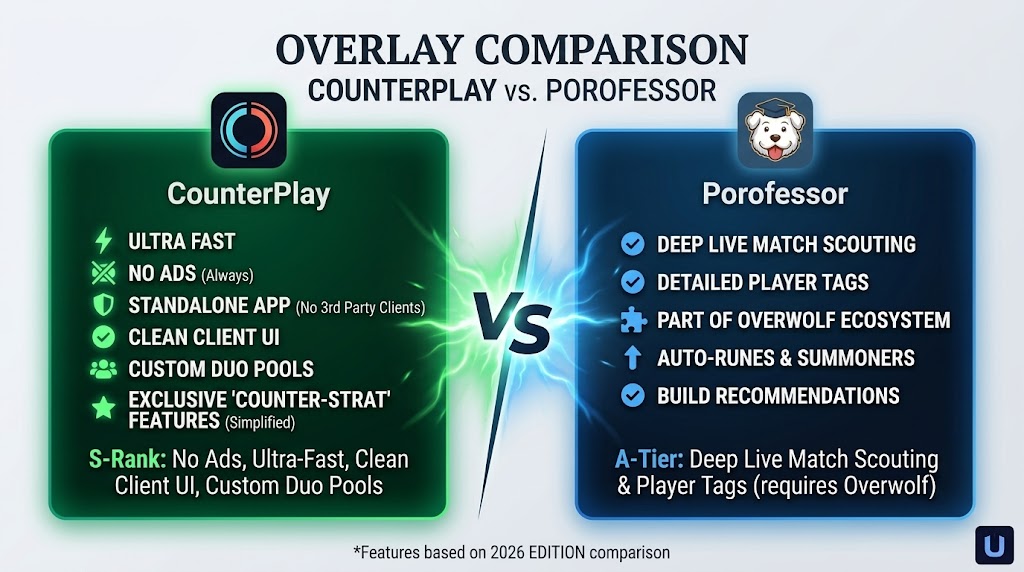
Porofessor operates on top of the Overwolf framework. While Overwolf provides a robust ecosystem for gaming apps, running a third-party framework in the background requires significant memory and CPU processing. On lower-end systems, this background overhead often leads to:
- Increased RAM usage during champion select and live matches.
- Frame drops (FPS stuttering) when intense particle effects appear on screen.
- Slow load times when transitioning from champion select into the loading screen.
- Background ad rendering that consumes extra system bandwidth.
By contrast, Counterplay was built as a lightweight, standalone Windows application. It runs natively without requiring any third-party app aggregators, ensuring that system resources remain dedicated to League of Legends itself.
Porofessor Breakdown: Features & Performance
Porofessor is one of the most widely used platforms in the League community, famous for its deep player tags and pre-game scouting.
Key strengths
- Live Match Tags: Instantly highlights player tendencies with tags like "Cold Streak", "Great Vision" or "OTP".
- In-Game Overlay: Displays jungle timers, gold leads, and summoner spell cooldown trackers directly on your screen during the match.
- Extensive Match History: Offers deep statistical breakdowns of previous games and player performance metrics.
Weaknesses
- Framework Dependency: Requires running Overwolf continuously in the background.
- Ad-Supported Model: Displays video ads and banner placements within the interface, which further increases hardware usage.
- Complex Drafting UI: The champion select screen displays an overwhelming amount of raw text and numbers, making it difficult to quickly identify the best counter-pick in under 30 seconds.
Counterplay Breakdown: Features & Performance
Counterplay was designed specifically to eliminate background bloatware and simplify the drafting phase for competitive players.
Key strengths
- Native Standalone Performance: Opens instantly and consumes minimal RAM and CPU, preventing FPS drops on low-end hardware.
- Client-Integrated UI Layout: The drafting interface mirrors the official League of Legends client aesthetic. Data is positioned where your eyes naturally look during pick and ban phases.
- Personal & Duo Champion Pools: Instead of suggesting generic global win-rate picks, Counterplay tracks your personal 30-day performance and coordinates champion pools with your duo queue partner.
- Ad-Free Experience: Completely clean interface with no pop-up advertisements, background video players, or paid subscriptions.
- Compact Side Dock: Displays your current rank trajectory, LP trends, and personal win rates in a sleek panel docked right beside your main client.
Weaknesses
- Draft-Focused Scope: Focused primarily on draft analysis, champion synergies, and counters rather than cluttered in-game overlays.
Feature & Performance Comparison
| Feature / Metric | Porofessor | Counterplay |
|---|---|---|
| Architecture | Requires Overwolf framework | Standalone native app |
| PC performance impact | Moderate to high (framework dependent) | Very low (low-end PC friendly) |
| Ad model | In-app video and banner ads | 100% ad-free |
| Drafting UI | Data-dense tables and text blocks | Clean, client-styled UI |
| Duo queue synergy tracking | Basic player history | Dedicated duo pool system |
| Personal stats tracking | Global stats and recent tags | Custom champion pool, 30-day win rates |
Which Overlay Should You Choose?
Choose Porofessor if:
- You have a powerful gaming setup with plenty of RAM and a high-end CPU.
- You rely heavily on live in-game overlays for tracking enemy summoner spells and jungle camp timers.
- You enjoy reading detailed player tags and opponent streak histories before the game starts.
Choose Counterplay if:
- You play on a budget PC or laptop and need zero FPS drops or lag during gameplay.
- You want a clean, ad-free experience without third-party frameworks running in the background.
- You prefer an intuitive drafting UI that mirrors the League client to quickly lock in the best counter-pick or duo synergy.
Conclusion
Both tools serve distinct types of League of Legends players. Porofessor remains a feature-packed option for players who want comprehensive in-game overlays and don't mind the extra system load.
However, if your primary goal is to optimize your draft decisions, track personal and duo champion pools, and maintain maximum FPS on a low-end system, Counterplay offers the most streamlined, ad-free solution available in 2026.