









Counterplay 的不同之处
不只是一份克制列表:这四项功能你每局都会用到。
紧凑侧边栏,一眼看全
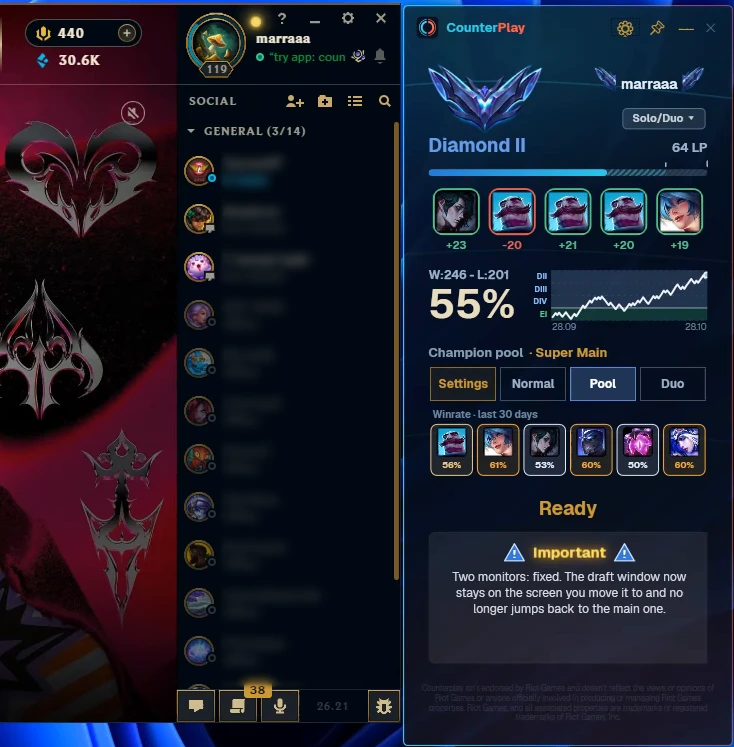
排队等待时,客户端旁会显示一个窄面板:段位和胜点、最近五场比赛、胜率曲线,以及你排队时使用的英雄池。
- 段位、胜点和最近五场比赛集中展示
- 英雄池中每个英雄近 30 天的胜率
- 一键切换普通、英雄池或双排模式
鼠标悬停,配合与克制即时变化
将鼠标悬停在推荐英雄上,队友和敌人周围的圆环会立即更新。锁定之前,你就能看到这个英雄是否适合当前这局选人。
- 队友圆环:这个选择与每位队友的配合程度
- 敌人圆环:能克制谁、又会被谁压制
- 数据来自真实对局的胜率
为单排和双排玩家准备的英雄池
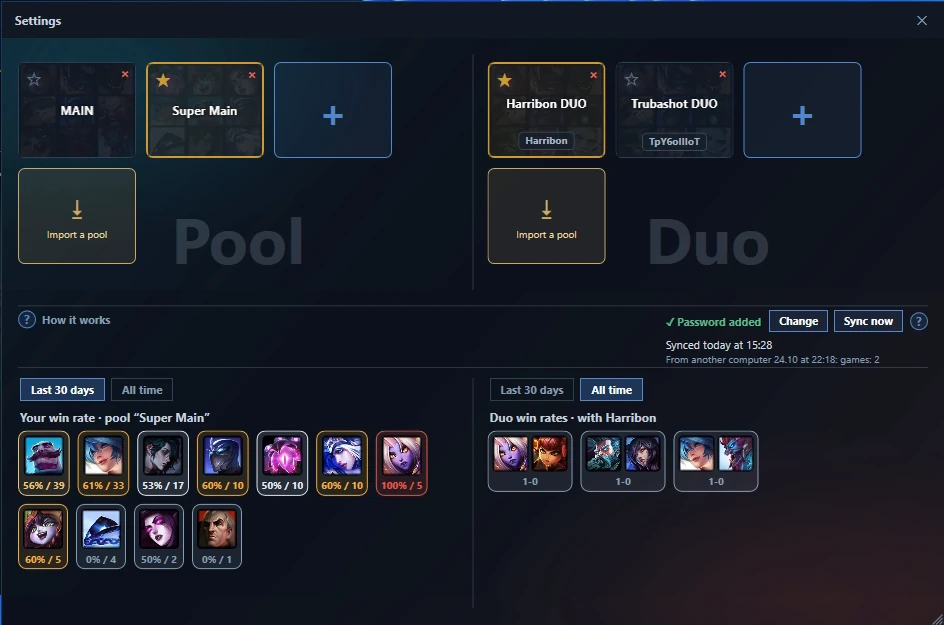
按位置添加你真正会玩的英雄,推荐会优先从你的英雄池中选出。和朋友一起玩?创建一个双排英雄池:Counterplay 会在房间里认出你的搭档,并推荐适合你们两人的英雄。
- 每个位置一个英雄池,并显示你在每个英雄上的胜率
- 双排英雄池包含搭档的英雄和你们组合的胜率
- 可以通过代码或文件与朋友分享英雄池
一键应用符文,外加 Counterplay AI 出装
锁定英雄后,Counterplay 会显示该英雄在你位置上的三个基石符文和最常用的出装。敌方五名英雄全部选定后,Counterplay AI 会针对这套阵容再给出第二套出装:分析对方的伤害类型、回复和控制,替换掉对他们几乎没用的装备。
- “应用符文”会创建符文页并设置召唤师技能,闪现保持在你习惯的按键上
- “导出”可把任意一套出装加入商店的装备套装
- AI 替换的装备会高亮显示,而且只选这个英雄上真正有人出的装备
工作原理
三步,建议就在眼前。
安装并运行
下载安装程序并启动 Counterplay。它会自动找到你的英雄联盟客户端。
进入 BP
在任意模式开始 BP。悬浮窗会出现在客户端旁边。
获取推荐
悬停英雄或锁定选择 —— 推荐会即时重新计算。
常见问题
安全合法吗?+
是的。Counterplay 只读取官方客户端 API(LCU),而且只在 BP 阶段工作 —— 进入游戏后不给任何提示,也不读取游戏内存。
会被封号吗?+
Counterplay 只读取官方客户端 API(LCU),只在英雄选择阶段给出建议。它从不读取游戏内存,不触碰游戏本身,比赛开始后不再显示任何建议。
需要登录 Riot 账号吗?+
不需要。应用绝不索取你的账号或密码,也无法访问你的账号。
Counterplay 免费吗?+
是的。Counterplay 在 Windows 10 和 11 上免费使用,没有广告。以后可能会推出高级功能,但核心功能会一直免费。
能把符文导入客户端吗?+
能。点击一下,推荐的符文页就会直接进入你的英雄联盟客户端。
会让游戏变卡吗?+
Counterplay 在英雄选择阶段工作。默认情况下,比赛开始时它会隐藏到系统托盘,不会在游戏画面上绘制任何内容。
胜率数据从哪来?+
来自当前版本的真实排位对局,通过官方 Riot API 收集,并按位置和段位汇总。
系统要求是什么?+
Windows 10 或 11。安装程序会配置好一切,无需手动设置。 Counterplay 是独立应用,无需额外平台。
Counterplay 目前完全免费。